
Collects Visual Studio Code configuration, extensions, workspace settings, and remote development telemetry for security and operational monitoring.
settings.json and argv.json (startup arguments)..vscode/settings.json, tasks.json, launch.json, and devcontainer.json.Typical runtime: macOS usually completes in under 10 seconds; Windows typically in under 60 seconds. The Windows script is pure batch and is designed to stay within cmd.exe’s ~8 KB environment-variable limit using chunked output and no external tools, ensuring compatibility on stock Windows hosts.
| Platform | Script | Requirements |
|---|---|---|
| Windows | vscode_audit.bat |
Windows 7+ with Batch (no PowerShell required) |
| macOS | vscode_audit.sh |
macOS 10.13+ with POSIX shell |
Both scripts detect installations for these variants and expose them via vscode:installation:
For v1: Full data collection (settings, extensions, sessions, workspace files) is limited to VS Code Stable. Other variants are reported in installation inventory only.
$SPLUNK_HOME/etc/apps/ on:props.conf + transforms.conf).KV_MODE = json).inputs.conf:index.interval (recommended: 3600 seconds).disabled = 0 in inputs.conf.Both scripts share a consistent CLI and output.
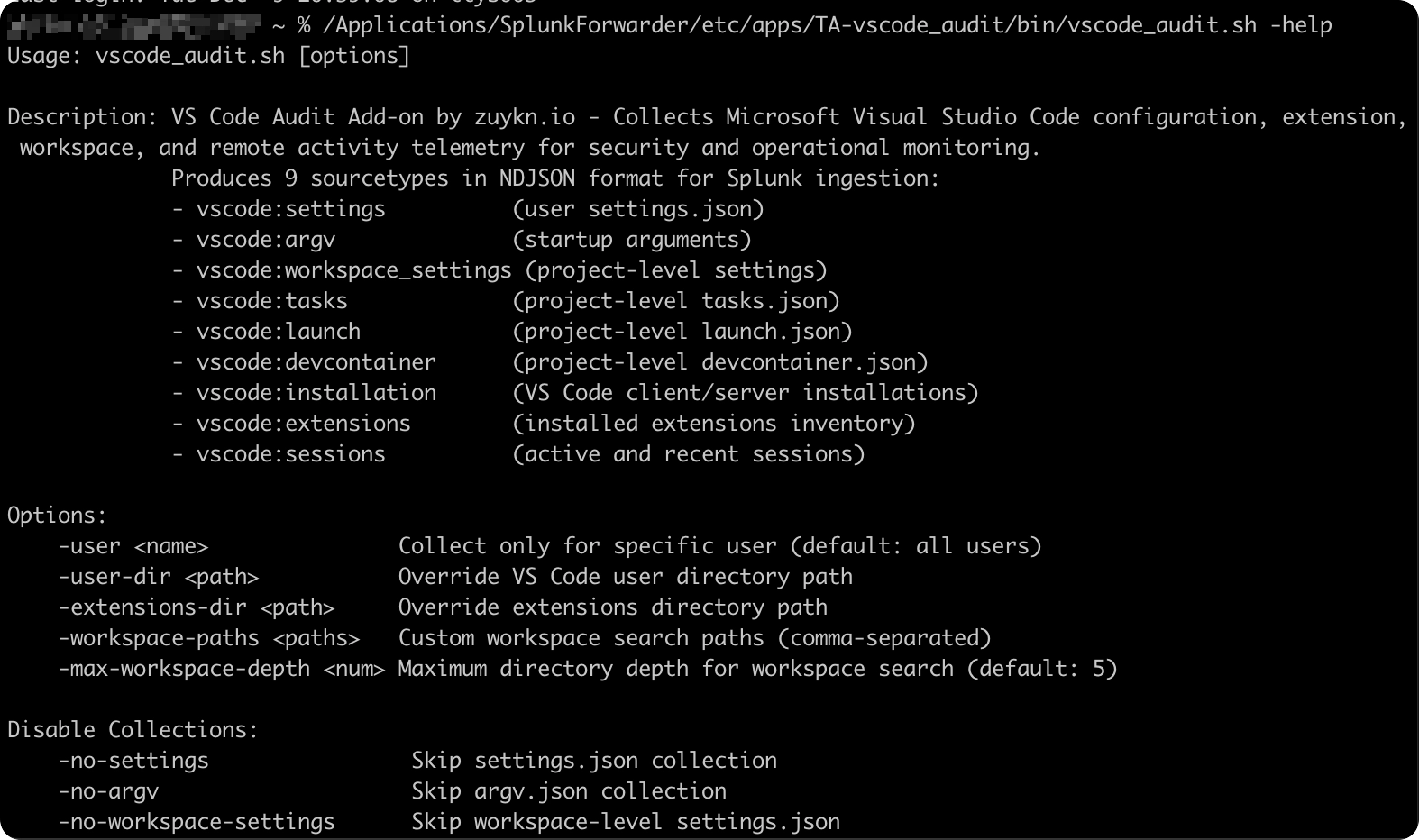
Usage: vscode_audit.[bat|sh] [options]

Options:
    -user <name>               Collect only for specific user (default: all users)
    -user-dir <path>           Override VS Code user directory path
    -extensions-dir <path>     Override extensions directory path
    -workspace-paths <paths>   Custom workspace search paths (comma-separated)
    -max-workspace-depth <num> Max workspace search depth (default: 5)

Disable collections:
    -no-settings               Skip settings.json
    -no-argv                   Skip argv.json
    -no-workspace-settings     Skip .vscode/settings.json
    -no-tasks                  Skip .vscode/tasks.json
    -no-launch                 Skip .vscode/launch.json
    -no-devcontainer           Skip .devcontainer/devcontainer.json
    -no-installation           Skip installation discovery
    -no-extensions             Skip extensions inventory
    -no-sessions               Skip session collection

Windows only:
    -grant-ssh-config-read     Grant SYSTEM read access to .ssh\config for SSH username detection
Note – SSH username detection (Windows): The scripts read
%USERPROFILE%\.ssh\configto resolve SSH usernames and auth methods. When Splunk runs as LocalSystem, it cannot read user SSH configs—SSH usernames will appear as"unknown". To enable SSH username detection, use the-grant-ssh-config-readflag or manually grant access:
cmd
icacls "C:\Users\<username>\.ssh\config" /grant "SYSTEM:R"
⚠️ Why this isn't default: Windows protects.sshdirectories with user-only ACLs by design—SSH clients require restricted permissions and will refuse to use keys if permissions are too open. The command above grants SYSTEM read access to only theconfigfile (not private keys). Evaluate whether exposing SSH config metadata (hostnames, usernames, key paths) to LocalSystem processes aligns with your security policies before enabling.
Windows:
# Basic collection (all users)
[script://.\bin\\vscode_audit.bat]
index = main
interval = 3600
disabled = 0

# Single user, skip devcontainer
[script://.\bin\vscode_audit.bat -user developer -no-devcontainer]
index = main
interval = 3600
disabled = 0

# Extensions-only audit for one user
[script://.\bin\vscode_audit.bat -user developer -no-settings -no-argv -no-workspace-settings -no-tasks -no-launch -no-devcontainer -no-installation -no-sessions]
index = main
interval = 3600
disabled = 0
macOS:
# Basic collection (all users)
[script://./bin/vscode_audit.sh]
index = main
interval = 3600
disabled = 0

# Single user, skip extensions
[script://./bin/vscode_audit.sh -user dev -no-extensions]
index = main
interval = 3600
disabled = 0

# Single user with custom workspaces, shallow scan
[script://./bin/vscode_audit.sh -user dev -workspace-paths "/Users/dev/src,/Users/dev/projects" -max-workspace-depth 3]
index = main
interval = 3600
disabled = 0
The add‑on supports 9 sourcetypes:
vscode:installationDiscovered VS Code installations (client and remote server components) per user. Use target to distinguish local client installs from remote server installs.
| Field | Description |
|---|---|
timestamp |
ISO 8601 event timestamp |
product_name |
Product variant name (Visual Studio Code, VSCodium, Cursor, etc.) |
user |
Local username |
version |
VS Code version number |
commit_id |
Git commit hash of the build |
architecture |
CPU architecture (x64, arm64) |
target |
client or server (remote) |
install_type |
user or system scope |
install_path |
Root installation directory |
executable_path |
Path to the VS Code binary |
update_url |
Update endpoint URL |
user_data_dir |
User settings directory |
extensions_dir |
Extensions directory |
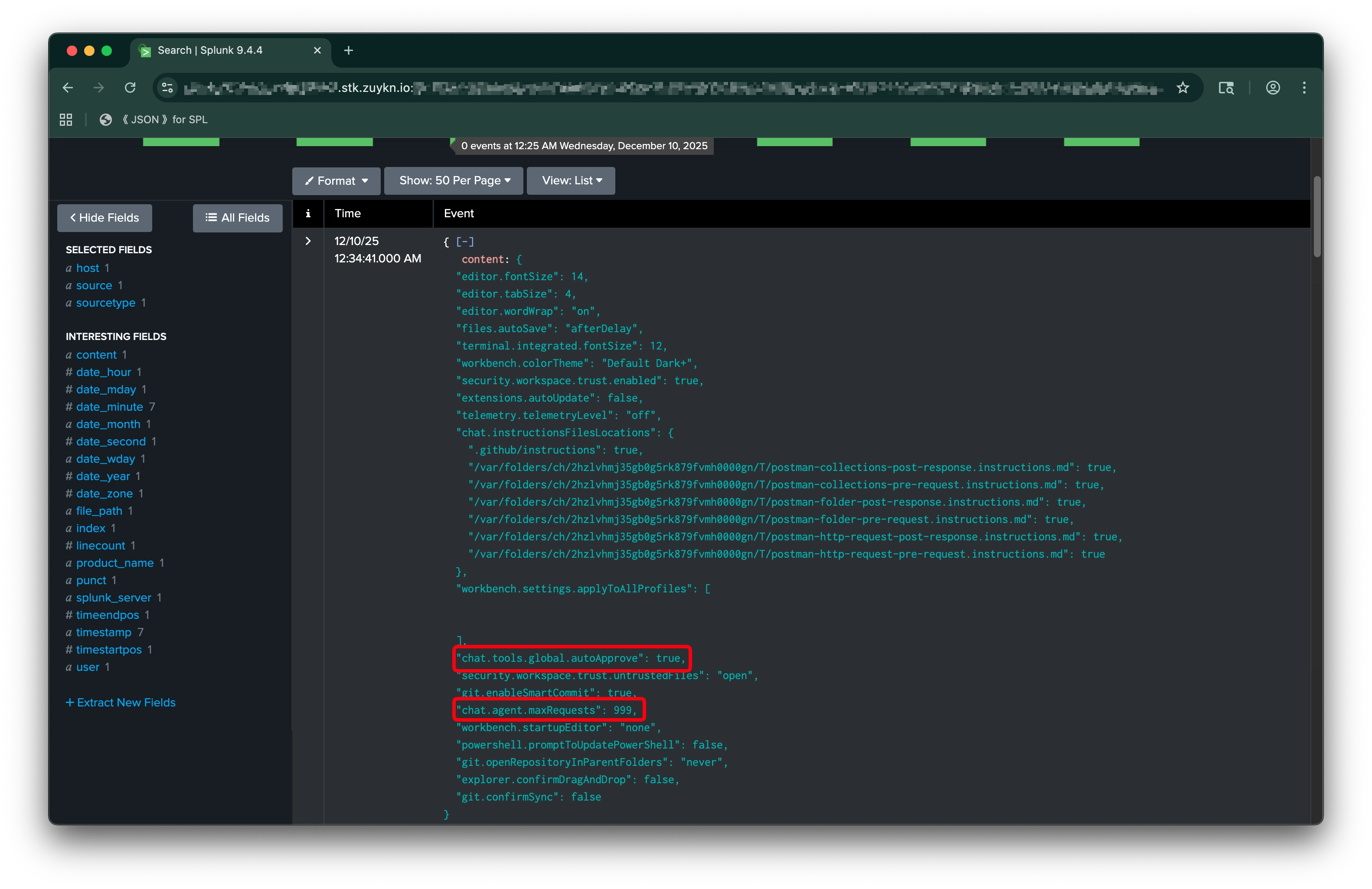
vscode:settingsUser-level settings.json containing editor preferences, enabled features, and security-relevant settings like workspace trust configuration.
| Field | Description |
|---|---|
timestamp |
ISO 8601 event timestamp |
product_name |
Product variant name |
user |
Local username |
file_path |
Path to settings.json |
content |
Raw file content |
vscode:argvUser-level argv.json containing VS Code startup arguments (locale, crash reporter settings, sandbox configuration).
| Field | Description |
|---|---|
timestamp |
ISO 8601 event timestamp |
product_name |
Product variant name |
user |
Local username |
file_path |
Path to argv.json |
content |
Raw file content |
vscode:workspace_settingsProject-level .vscode/settings.json containing workspace-specific editor and language settings that may override user defaults.
| Field | Description |
|---|---|
timestamp |
ISO 8601 event timestamp |
product_name |
Product variant name |
user |
Local username |
file_path |
Path to workspace settings.json |
content |
Raw file content |
vscode:tasksProject-level .vscode/tasks.json defining build, test, and automation tasks.
| Field | Description |
|---|---|
timestamp |
ISO 8601 event timestamp |
product_name |
Product variant name |
user |
Local username |
file_path |
Path to tasks.json |
content |
Raw file content |
vscode:launchProject-level .vscode/launch.json defining debug configurations, including program paths, environment variables, and remote attach settings.
| Field | Description |
|---|---|
timestamp |
ISO 8601 event timestamp |
product_name |
Product variant name |
user |
Local username |
file_path |
Path to launch.json |
content |
Raw file content |
vscode:devcontainerProject-level .devcontainer/devcontainer.json defining development container configuration (base image, features, extensions, port forwarding, and post-create commands).
| Field | Description |
|---|---|
timestamp |
ISO 8601 event timestamp |
product_name |
Product variant name |
user |
Local username |
file_path |
Path to devcontainer.json |
content |
Raw file content |
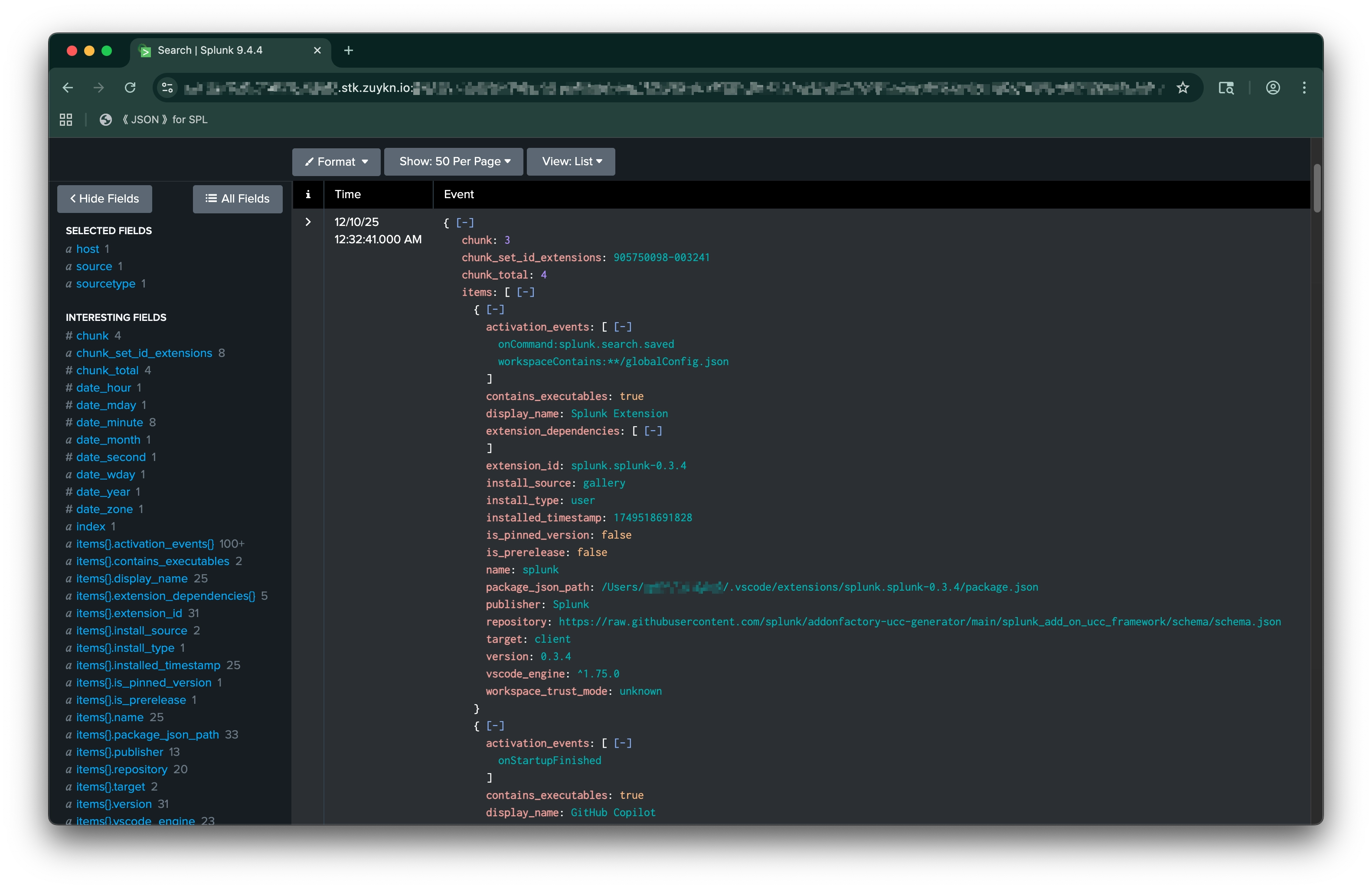
vscode:extensionsInstalled extensions inventory for client and server environments (chunked, 5 items/event). Includes install source, trust mode, executable detection, and activation events.
| Field | Description |
|---|---|
timestamp |
ISO 8601 event timestamp |
product_name |
Product variant name |
user |
Local username |
chunk_set_id_extensions |
Unique ID to correlate chunks for this collection run |
chunk |
Current chunk index (0-based) |
items |
Array of extension objects (see below) |
Extension object fields (within items array):
| Field | Description |
|---|---|
extension_id |
Directory name with version (e.g., ms-python.python-2025.1.0) |
name |
Internal extension name |
display_name |
Human-readable name |
publisher |
Extension publisher |
version |
Extension version |
target |
client or server |
install_source |
gallery (VS Code Marketplace), vsix (manual/local .vsix file, potentially from OpenVSX), or unknown |
installed_timestamp |
Unix timestamp of installation |
is_prerelease |
Whether prerelease version |
is_pinned_version |
Extension is locked to a specific version |
vscode_engine |
Minimum required VS Code version |
workspace_trust_mode |
Extension's compatibility with VS Code workspace trust: supported, unsupported, limited, or unknown |
contains_executables |
Extension contains one or more of the following executable files: • Native: .exe, .dll, .so, .dylib, .node, .a, .lib• Bytecode: .wasm, .jar, .class, .pyc, .pyo• Scripts: .ps1, .bat, .cmd, .sh, .bash, .py, .rb, .pl, .lua, .vbs, .fish |
activation_events |
Events that trigger activation |
extension_dependencies |
List of required extension IDs (dependencies) |
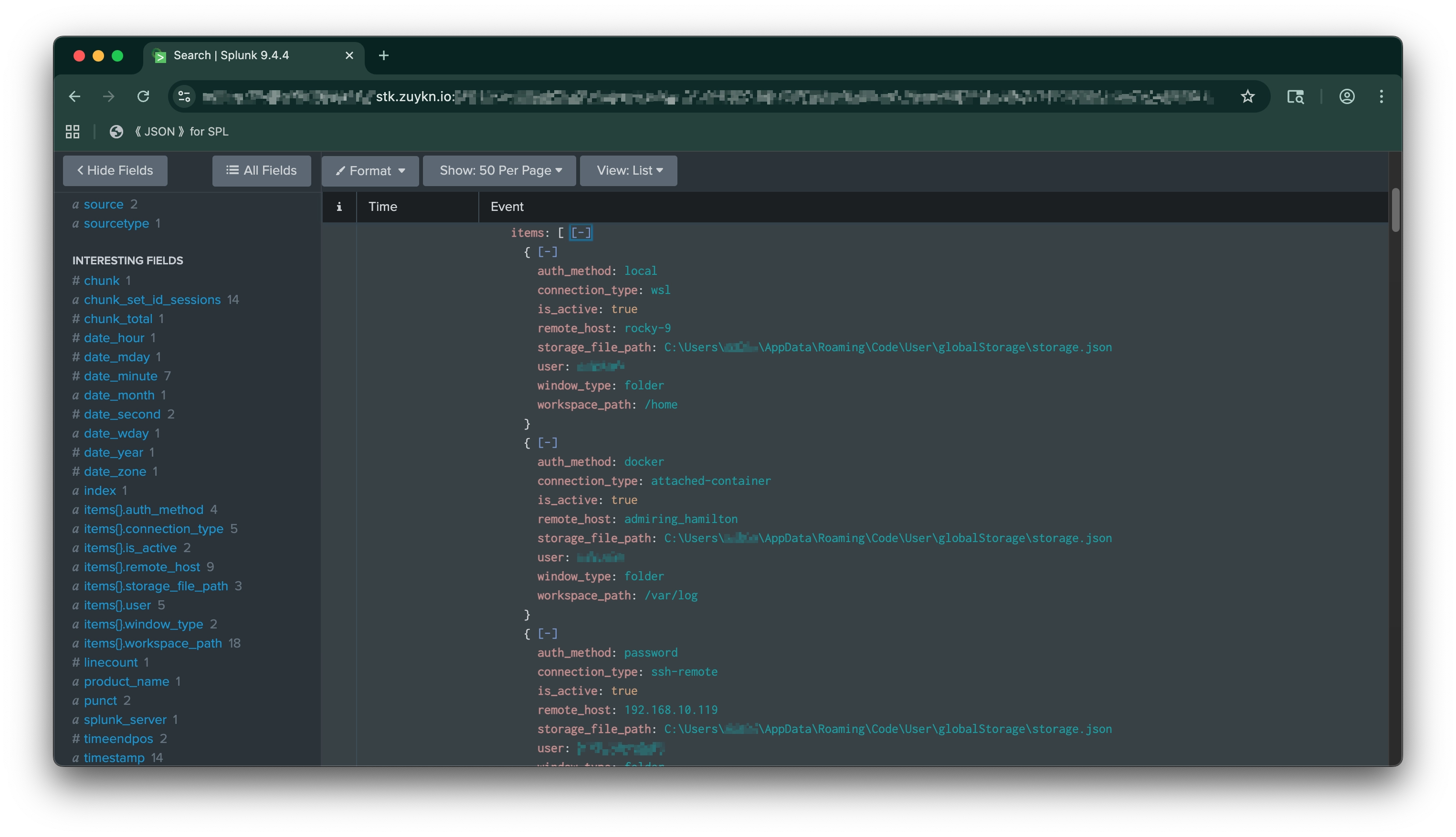
vscode:sessionsActive and recent sessions inventory (chunked, 5 items/event). Tracks local, SSH, WSL, and container connections with authentication method and workspace context.
| Field | Description |
|---|---|
timestamp |
ISO 8601 event timestamp |
product_name |
Product variant name |
user |
Local username |
chunk_set_id_sessions |
Unique ID to correlate chunks for this collection run |
chunk |
Current chunk index (0-based) |
items |
Array of session objects (see below) |
Session object fields (within items array):
| Field | Description |
|---|---|
connection_type |
local, ssh-remote, wsl, dev-container, attached-container |
remote_host |
SSH host, WSL distro, or container name |
user |
Remote username (or local user if unknown) |
auth_method |
local, publickey, password, docker |
window_type |
folder, workspace, or empty |
workspace_path |
Path to opened folder/workspace |
is_active |
true if VS Code running and window open |
storage_file_path |
Path to storage.json source |
Note – Remote username resolution: For recent SSH sessions,
useris resolved from theUserdirective in SSH config; historical sessions reportunknownto avoid assumptions. Container sessions always reportunknownas Docker doesn't expose this context.
Need help, want a custom version, or have a feature request? Contact us—we're happy to help!
- Website: https://zuykn.io
- Docs: https://docs.zuykn.io
- Email: support@zuykn.io
This add-on is licensed under the zuykn Private Commercial Use License Version 1.0.
See the LICENSE file in the project root for full terms.
© 2023–2025 zuykn. All Rights Reserved.
View release notes on GitHub:
https://github.com/zuykn/TA-vscode_audit/releases/tag/v1.0.0
As a Splunkbase app developer, you will have access to all Splunk development resources and receive a 10GB license to build an app that will help solve use cases for customers all over the world. Splunkbase has 1000+ apps from Splunk, our partners and our community. Find an app for most any data source and user need, or simply create your own with help from our developer portal.