icon/x Created with Sketch.

Splunk Cookie Policy

We use our own and third-party cookies to provide you with a great online experience. We also use these cookies to improve our products and services, support our marketing campaigns, and advertise to you on our website and other websites. Some cookies may continue to collect information after you have left our website. Learn more (including how to update your settings) here.
Accept Cookie Policy

We are working on something new...

A Fresh New Splunkbase
We are designing a New Splunkbase to improve search and discoverability of apps. Check out our new and improved features like Categories and Collections. New Splunkbase is currently in preview mode, as it is under active development. We welcome you to navigate New Splunkbase and give us feedback.

Accept License Agreements

This app is provided by a third party and your right to use the app is in accordance with the license provided by that third-party licensor. Splunk is not responsible for any third-party apps and does not provide any warranty or support. If you have any questions, complaints or claims with respect to this app, please contact the licensor directly.

Thank You

Downloading Virsec Security Platform - Threat Dashboard
SHA256 checksum (virsec-security-platform-threat-dashboard_280.tgz) eab0c3375c87a908d27ee5a6cc2593dbb4a3258b9818c5a9f6a65cfb1e2fd486 SHA256 checksum (virsec-security-platform-threat-dashboard_272.tgz) ea1e77761530d3f1515cc01cb1c9d0ffa41cb9ee0603a180c6380a19720e1556 SHA256 checksum (virsec-security-platform-threat-dashboard_271.tgz) b464a1ce3961b6024e184e5171e3e80195c792d3ff84f441204cc7fc7bcb0485 SHA256 checksum (virsec-security-platform-threat-dashboard_270.tgz) 6e3bdc5b1d56e8133ff6858cf084215c3933bd37ea153f24fdebc8ee81aa443f SHA256 checksum (virsec-security-platform-threat-dashboard_200.tgz) 130206529589a28be82e865a0c69f63b1eb8334722e2cb48477a1a7996342a4f SHA256 checksum (virsec-security-platform-threat-dashboard_100.tgz) cb70ba8f87a8af20011565869728aa9ed91e0c8d3d55788b8b0000b475e45ae9
To install your download
To install apps and add-ons from within Splunk Enterprise
  1. Log into Splunk Enterprise.
  2. On the Apps menu, click Manage Apps.
  3. Click Install app from file.
  4. In the Upload app window, click Choose File.
  5. Locate the .tar.gz file you just downloaded, and then click Open or Choose.
  6. Click Upload.
  7. Click Restart Splunk, and then confirm that you want to restart.
To install apps and add-ons directly into Splunk Enterprise
  1. Put the downloaded file in the $SPLUNK_HOME/etc/apps directory.
  2. Untar and ungzip your app or add-on, using a tool like tar -xvf (on *nix) or WinZip (on Windows).
  3. Restart Splunk.
After you install a Splunk app, you will find it on Splunk Home. If you have questions or need more information, see Manage app and add-on objects.

Flag As Inappropriate

splunk

Virsec Security Platform - Threat Dashboard

This app has been archived. Learn more about app archiving.
This app is NOT supported by Splunk. Please read about what that means for you here.
Overview
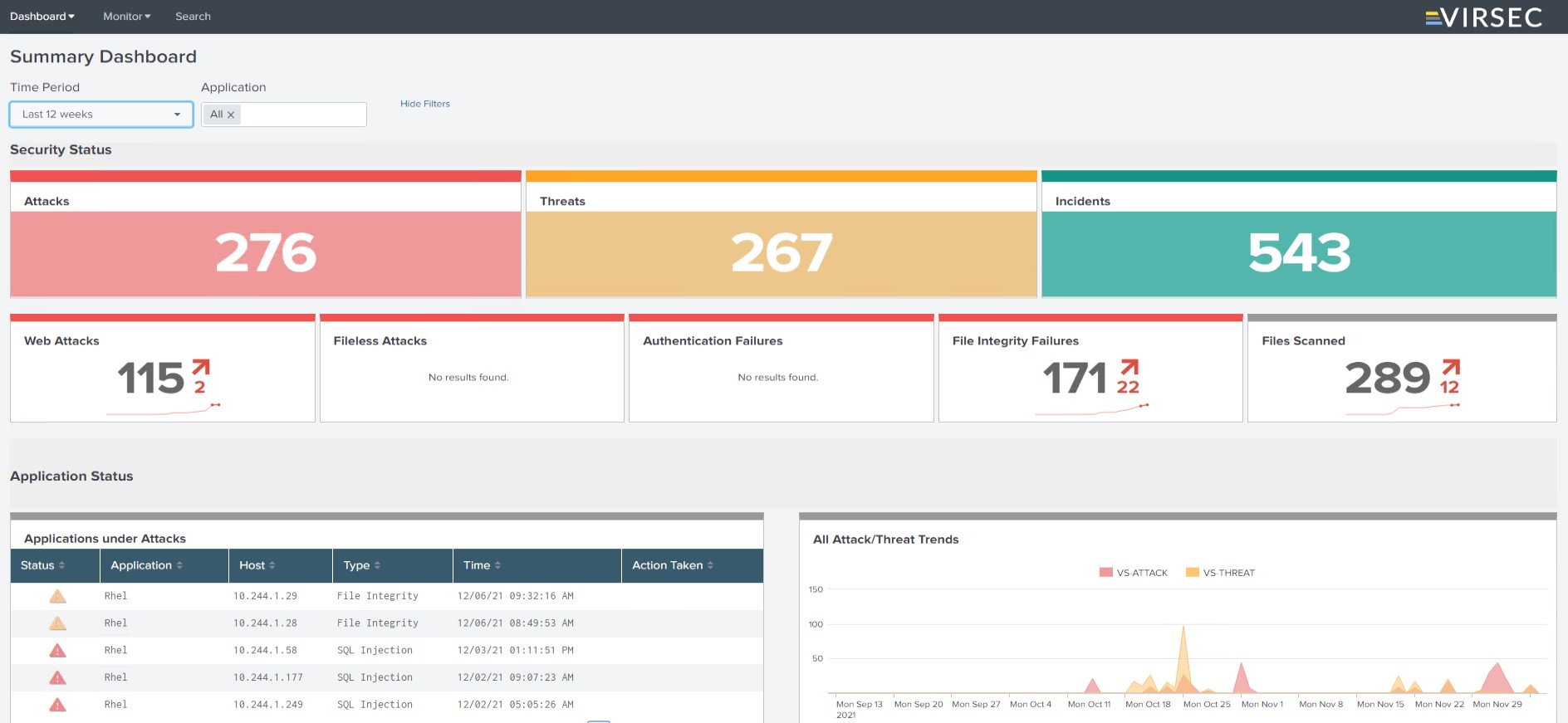
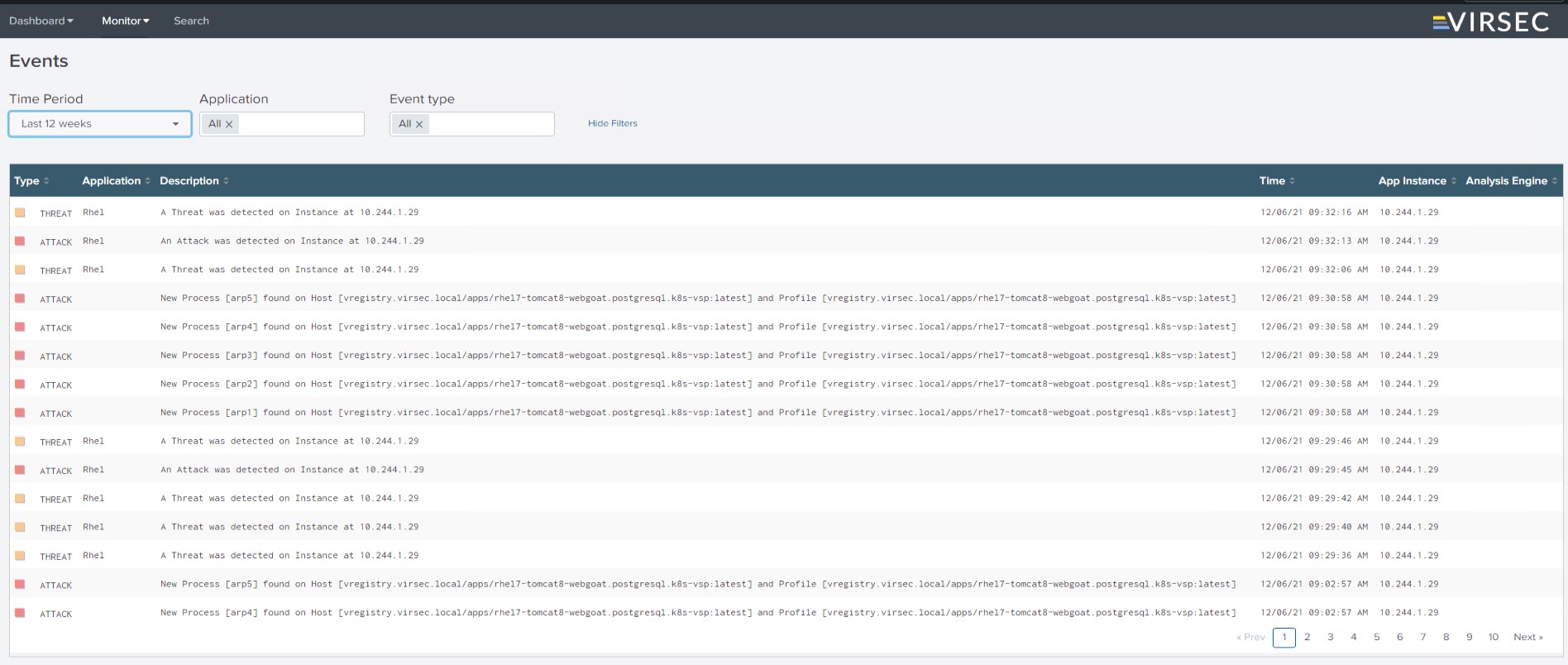
The Virsec Security Platform Splunk App is a comprehensive Threat monitoring dashboard that gives complete operational intelligence across all your server endpoints. It covers the following categories of attacks and trending

-File-less attacks (Buffer overflow DLL Injection, Memory corruption, process injection, etc)
-File System Monitoring and Integrity Monitoring attacks-
-Web-Based Attacks(OWASP Top-10)
-Complete List of Applications provisioned and protected

Visit https://docs.virsec.com for more

Release Notes

Version 2.8.0
July 5, 2023
Version 2.7.2
May 15, 2023
Version 2.7.1
May 15, 2023
Version 2.7.0
May 8, 2023

Support for VSP version 2.7.0

Version 2.0.0
Dec. 6, 2021
  • File integrity failure tile and respective incident listing through the drill down on the tile
  • Updated the color-coding with the new VSP CMS dashboard
  • Added new widgets in the dashboard
  • Update new Virsec logo
Version 1.0.0
Aug. 23, 2018

The Splunk App for Virsec Systems renders the entire Virsec CMS threat dashboard in Splunk. The Splunk App covers all monitoring screens and widgets displayed on the Virsec Security Platform CMS dashboard.


Subscribe Share

Are you a developer?

As a Splunkbase app developer, you will have access to all Splunk development resources and receive a 10GB license to build an app that will help solve use cases for customers all over the world. Splunkbase has 1000+ apps from Splunk, our partners and our community. Find an app for most any data source and user need, or simply create your own with help from our developer portal.

Follow Us:
Splunk, Splunk>,Turn Data Into Doing, Data-to-Everything, and D2E are trademarks or registered trademarks of Splunk LLC in the United States and other countries. All other brand names,product names,or trademarks belong to their respective owners.